
Roblox UGC Requirements Checker
Upload your accessory or layered clothing and see if it will pass Roblox's upload validation — catch blockers before the Studio round-trip. Free.
What is the Roblox UGC Requirements Checker?
The Roblox UGC Requirements Checker is a free browser tool that inspects an accessory or layered-clothing model (GLB, GLTF or FBX) against Roblox's UGC requirements — triangle count, texture size, single material, cages, skinning and bounding box — and returns a red/amber/green report with a fix for every issue. It's an approximate pre-check; Roblox's validation at upload is authoritative.
How it works
Three steps from an untested model to a clear, fix-by-fix report — before you spend a single Robux.
 1
1Upload your model
Drag in a GLB, GLTF or FBX accessory or layered-clothing file (up to 50 MB) and pick its type. We read the file's real contents first, so a broken upload never wastes a check.
 2
2Read your report
In about 30 seconds you get a red / amber / green report — 22 checks for clothing, 12 for accessories — with a plain-language fix for every issue that fails.
 3
3Fix and re-check
Work through the fixes, then run it again. If the cages are missing or broken, jump straight to the Cage Generator to rebuild them, then verify here.
See what the report catches
Every upload returns a pass, warn and fail breakdown across the checks Roblox runs before your item goes live.
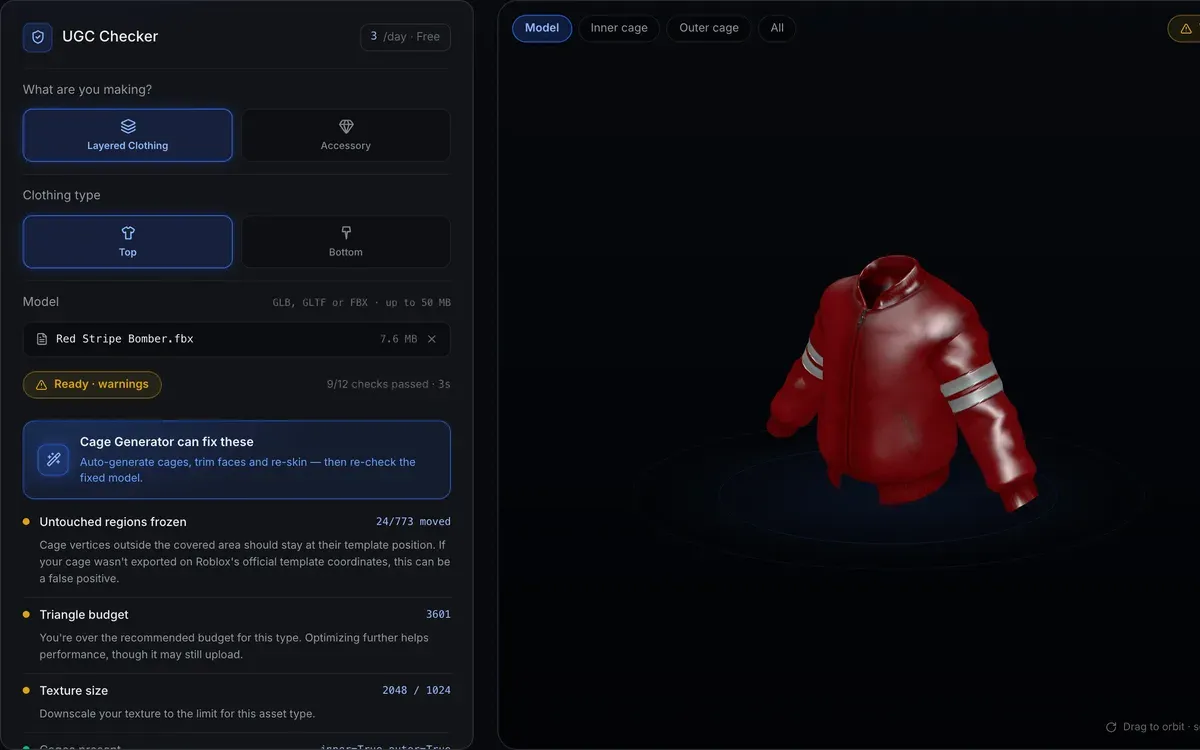
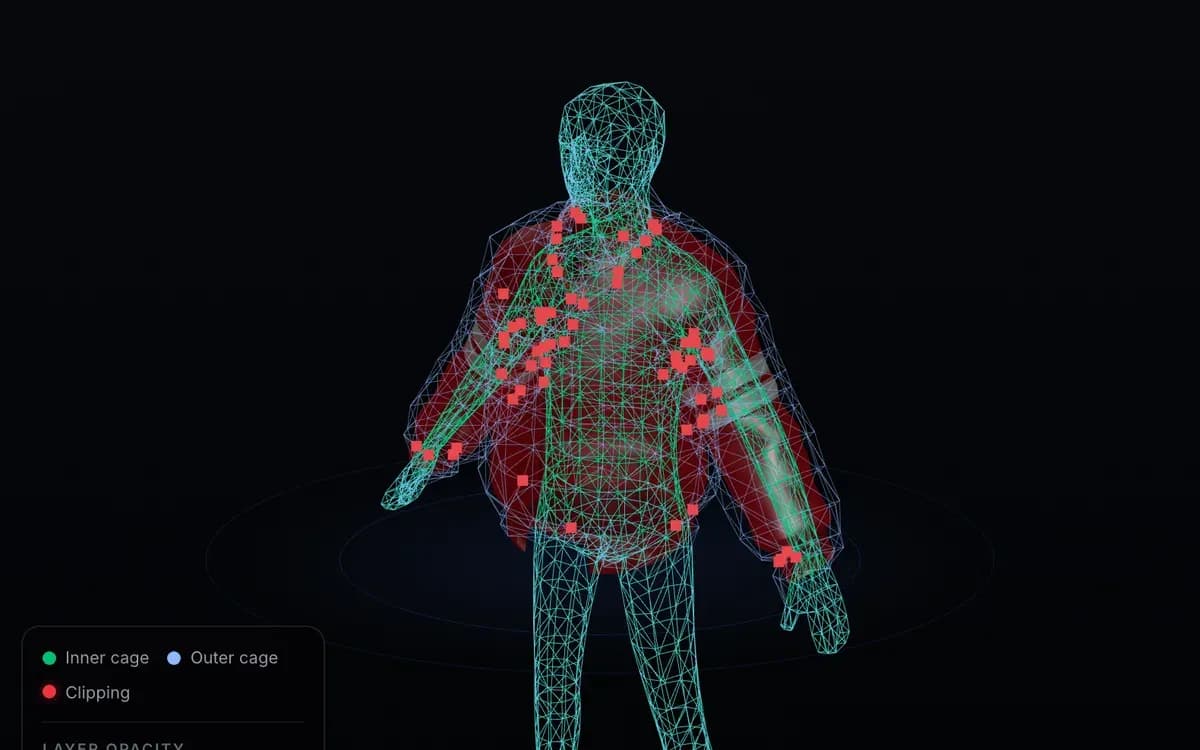
X-ray the inner and outer cages
Upload and hope, or check first?
A failed validation in Studio costs you the whole round-trip, and a moderation rejection after submission forfeits the 80 Robux fee. Here is how a blind attempt, a manual Studio check and this tool compare.
| Factor | Upload & hope | Manual Studio check | UGC Checker |
|---|---|---|---|
| Cost to try | Full Studio round-trip per attempt; 80 Robux forfeited if moderation rejects | Free, but hours of your time | Free |
| Time to a verdict | Upload, wait for validation, repeat | Learn Roblox's validation rules first | ~30 seconds |
| What you learn | One terse error at a time | Only what you remember to inspect | Up to 22 checks at once, each with a fix |
| What you need | A paid upload slot to test with | Roblox Studio installed + rigging know-how | Just a browser |
Frequently asked questions
What are the requirements for Roblox UGC?
+
To pass Roblox's upload validation a UGC item has to satisfy several rules at once: a triangle count under the per-type limit (4000 triangles for both accessories and layered clothing), a single material, a texture within Roblox's 2048 px cap, correct inner and outer cage meshes for layered clothing, and valid R15 skinning with at most 4 influences per vertex. Publishing costs an 80 Robux upload fee per submission plus a publishing advance that varies by asset type, and requires ID verification. This checker inspects the file-level rules before you even open Studio.
Are accessory and layered clothing requirements the same?
+
No. Accessories such as hats, hair and gear run through 12 checks — triangle count, single material, texture size, attachment and mesh health — and don't need cages. Layered clothing runs through all 22 checks because it also needs an inner cage, an outer cage matching Roblox's template, and full R15 skinning so it deforms with the body. The checker switches its rule set based on the type you choose.
Why did my Roblox upload fail validation?
+
The most common causes are a missing or wrong cage (layered clothing with no inner/outer cage, or a cage whose vertex count was changed), missing skinning data, a mismatched UV on the cage, more than one material, or a triangle count over the limit. Each of these shows up as a terse 'validation failed' message in Studio — the checker names the exact rule that failed and gives the fix, so you're not guessing.
How much does it cost to upload UGC to Roblox?
+
Roblox charges an 80 Robux upload fee per submission, plus a publishing advance that varies by asset type and is recovered from early sales. You also need ID verification and 2FA on the account. Studio runs the technical validation before you pay — but a moderation rejection after submission forfeits the upload fee, and every failed attempt costs you a full Studio round-trip. That's why a free pre-check pays off: the checker itself costs nothing.
Does passing the checker guarantee my item will be accepted?
+
No, and we won't claim it does. The checker is an approximate pre-check that mirrors Roblox's file-level rules; Roblox's own validation at upload is the authoritative step, and it also applies moderation and policy checks we can't see. Treat a green report as 'the common file problems are handled', not a guarantee — it removes avoidable failures so the paid upload has the best chance.
How is the checker different from the Cage Generator?
+
The checker is the diagnosis; the Cage Generator is one of the treatments. The checker inspects an existing file and tells you what's wrong. If it reports missing or broken cages, the Cage Generator builds a correct inner and outer cage plus R15 skinning automatically. Run the checker first, fix what it flags — with the Cage Generator when cages are the issue — then re-check.
What are inner and outer cages?
+
Cages are invisible reference meshes that tell Roblox how layered clothing wraps an avatar. The inner cage matches the body underneath and the outer cage defines the garment's outer surface, so items can stack in the right order. They must match Roblox's official cage template exactly — 1358 vertices with untouched UVs — which is why the checker verifies both the vertex count and the UVs, not just that a cage is present.
Is the UGC checker free, and is there a daily limit?
+
Yes, it's free. During early access you can run up to 3 checks per day per account, which is enough to iterate a single item to green. If you hit the limit, come back tomorrow, or use the Cage Generator to fix cage issues in the meantime.
What texture size does Roblox allow?
+
Roblox's Marketplace cap is 2048 px — production items ship at 2048 px and pass review. Textures above the cap aren't rejected either: Roblox automatically downscales them on upload. The checker therefore warns above 2048 px instead of failing you — a bigger texture still uploads, it just wastes memory for no visual gain.
Explore more UGC tools
Roblox Clothing Cage Generator
Auto-build the inner and outer cages plus R15 skinning your layered clothing needs — the fix for most cage failures.
Open toolRoblox Clothing Maker
Generate layered 3D clothing from text or an image — rigged, caged and ready, no upload needed.
Open toolRoblox Clothing Tester
Preview any clothing model on an R15 avatar in your browser before you publish.
Open toolRoblox Accessory Maker
Create 3D hats, hair, wings and gear from a prompt or image — no Blender.
Open toolRoblox UGC Ideas
See what is actually selling across 13 categories before you decide what to make next.
Open toolFound a problem? Fix it fast.
If the checker flags missing or broken cages, the Cage Generator rebuilds them — inner cage, outer cage and R15 skinning — automatically. Then bring the file back here to confirm it's green.
Last updated 2026-10-11