
Roblox Clothing Cage Generator
Upload your clothing mesh and get a Roblox Studio-ready package — cages, R15 skinning, and a pre-check report — in about 60 seconds. Free.
What is the Roblox Clothing Cage Generator?
The Roblox Clothing Cage Generator is a free browser tool that turns a clothing 3D model (GLB, GLTF or FBX) into a Roblox Studio-ready package — inner and outer cage meshes, R15 skinning, and an 12-point pre-check report — in about 60 seconds, with no Blender and no install.
How it works
Three steps from a raw clothing mesh to a Roblox Studio-ready package — no rigging experience required.
 1
1Upload your clothing model
Drag in a GLB, GLTF or FBX top or bottom (up to 50 MB) and pick its category. We validate the file first, so a bad file never costs you a run.
 2
2Auto cage & skin
We fit inner and outer cage meshes to your garment and bind R15 skinning automatically, then run an 12-point pre-check that flags issues before Roblox does.
 3
3Download & import
Grab the Studio-ready package and bring it into Roblox with the 3D Importer or Accessory Fitting Tool, following the built-in step-by-step guide.
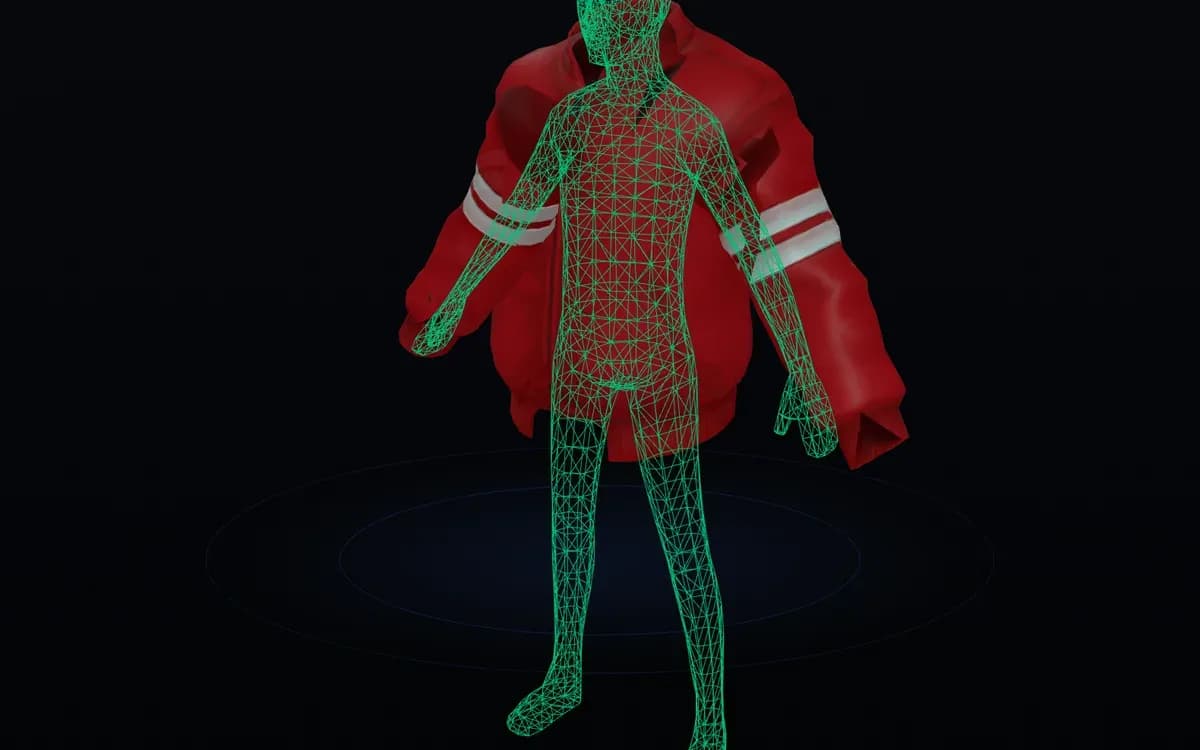
See the cage fitted to your garment
Manual, freelancer, or automatic?
Caging and skinning layered clothing by hand is the slowest part of the pipeline. Here is how the options compare.
| Task | Manual (Blender) | Freelancer (Fiverr) | Cage Generator |
|---|---|---|---|
| Time per item | 4–8 hours | 1–3 days turnaround | ~60 seconds |
| Cost | Free (your own hours) | $10–$80 per item | Free |
| Skill needed | Blender + weight painting | None (someone else's) | None — upload and go |
| Cages & skinning | Painted and rigged by hand | Depends on the seller | Automatic inner + outer cage and R15 skin |
| Pre-check | Trial and error in Studio | Not included | 12-point report before you import |
| Setup | Desktop software install | Order and wait | Runs in your browser |
Frequently asked questions
What is a Roblox cage generator?
+
A Roblox cage generator is a tool that automatically creates the cage meshes layered clothing needs. A cage is an invisible reference mesh that tells Roblox how a garment wraps and deforms around an avatar: layered clothing needs an inner cage (matching the body underneath) and an outer cage (defining the outer surface) so items can stack correctly. This tool generates both automatically.
Do I need Blender to use this tool?
+
No. The whole process runs in your browser. You upload a finished clothing model and download a rigged, Studio-ready package — no Blender, no weight painting and no plugins. Blender is only needed if you want to model the garment itself from scratch.
Will my clothing pass Roblox's validation?
+
The built-in pre-check runs 12 checks that approximate Roblox's own requirements, so most fixable problems are caught before you upload. It is an approximation, though — the final, authoritative validation always happens when you import into Roblox Studio or publish to the Marketplace.
How is this different from Roblox's official Avatar Setup?
+
Roblox's Avatar Setup can auto-cage clothing for free inside Studio, and it's a solid option. This tool is a web alternative: nothing to install, it runs on any device, it adds an 12-point pre-check report, and it sits next to our AI Clothing Maker so you can generate and rig in one place. Use whichever fits your workflow.
What file formats can I upload?
+
GLB, GLTF and FBX, up to 50 MB. FBX is the usual Blender export for Roblox, so it's fully supported. We check the file's actual contents, not just its extension, before processing. OBJ and .blend files are not supported in this version.
Does it support sleeveless tops, skirts or unusual shapes?
+
Standard tops and bottoms that follow the avatar topology work best. Sleeveless tops, skirts and similar garments are supported as long as the mesh is clean. Heavily degenerate, non-manifold or non-clothing shapes may be rejected by the pre-check with an explanation — in that case, generating a fresh model with the AI Clothing Maker is usually faster.
What happens if automatic skinning can't fit my mesh?
+
If a clean skin bind isn't possible, the pipeline falls back to AutoSkin — a best-effort weighting that keeps the item usable — and the report flags it so you know to double-check deformation in Studio. You won't be left with a broken, un-rigged file.
What are the new Roblox upload fees for clothing?
+
Those fees are Roblox's, not ours. Roblox currently charges an 80 Robux upload fee per submission, plus a publishing advance that varies by asset type on your first Marketplace items, and requires ID verification and 2FA on your account. Studio validates your file before any fee is due — this tool only prepares the file, and using it is free.
Is the tool free, and how many models can I process per day?
+
Yes, it's free. You can process up to 3 uploads per day per account during early access, which is enough to prepare most outfits. If you hit the limit, come back tomorrow or generate a ready-rigged outfit instantly with the AI Clothing Maker.
Explore more UGC tools
Roblox Clothing Maker
Generate layered 3D clothing from text or an image — rigged and ready, no upload needed.
Open toolRoblox Shirt Maker
Design classic shirts, pants and t-shirts with AI and upload-ready textures.
Open toolRoblox Accessory Maker
Create 3D hats, hair, wings and gear from a prompt or image — no Blender.
Open toolRoblox Clothing Tester
Preview any clothing model on an R15 avatar in your browser before you publish.
Open toolRoblox UGC Requirements Checker
Check if your accessory or layered clothing passes Roblox's upload validation — free, before the Studio round-trip.
Open toolSkip the caging altogether
Let AI generate layered clothing that arrives already caged, skinned and Studio-ready — then come back here whenever you need to rig your own mesh.
Last updated 2026-10-11